
Smart Launcher APK
Unknown DeveloperVaries · Free · Safe · Verified
Share This App
Scan to Download
Scan with Android camera
Screenshots
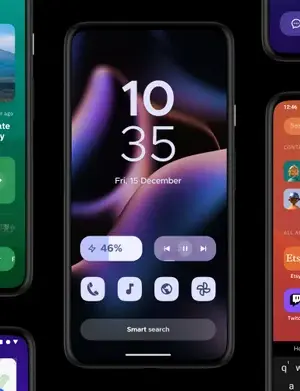
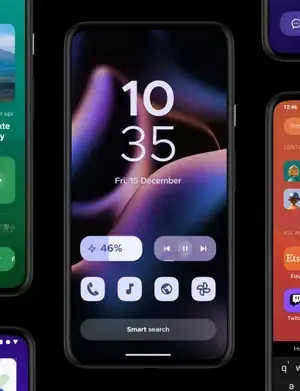
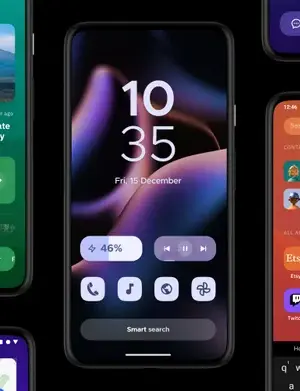
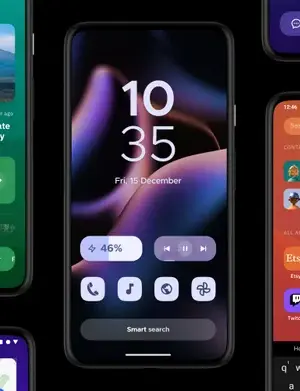
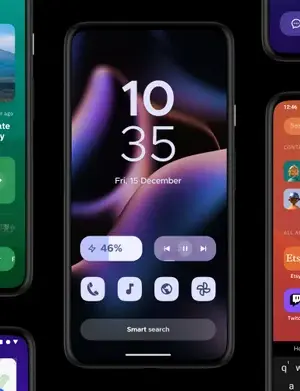
About Smart Launcher
Smart Launcher offers a streamlined approach to personalizing your Android device, enhancing both aesthetics and functionality. With its latest features emphasizing user experience, this app stands out as a solid choice for anyone looking to optimize their home screen.
Related in Personalization: Live Wallpapers 4K, HD, 3D · Smart Cleaner · WASticker
| App Name | Smart Launcher |
|---|---|
| Version | Latest |
| Developer | Unknown Developer |
| Package Name | ginlemon.flowerfree |
| Category | Personalization |
| Size | Varies |
| Downloads | N/A |
| Rating | N/A |
| Android Version | Varies |
| Updated | 2026-08-13 |
Overview
Smart Launcher is a free personalization app designed to enhance the way users interact with their Android devices. Unlike traditional launchers that clutter the home screen with app icons, Smart Launcher introduces a more organized and visually appealing interface. The app is versatile, supporting various Android versions and devices, making it accessible for a wide audience. Its architecture allows for universal compatibility, ensuring that users can enjoy a consistent experience regardless of their device’s specifications. Regular updates, the latest dated August 13, 2026, indicate active development and responsiveness to user needs.
The latest release introduces features that improve usability and media consumption. For instance, the new Widget Stack functionality allows users to group widgets together, making for a cleaner home screen. Additionally, the app now supports vertical scrolling, which can enhance navigation and accessibility. These updates reflect the developer’s commitment to refining the user experience, particularly in a landscape where personalization is paramount.
Feed Reader capabilities within Smart Launcher have been notably enhanced. Users can now engage with news content through a dedicated Reading Mode, eliminating distractions like pop-ups and ads. This mode is particularly beneficial for avid readers who want a focused environment while staying informed. Users can customize their feeds further by utilizing features such as the Word Blacklist, filtering out unwanted topics effectively.
In addition, the app’s ability to fix broken RSS feeds automatically improves the reliability of content delivery. Smart Launcher’s organization features, such as reassigning topics to RSS providers, contribute to a more tailored user experience. Addressing common pain points for users, these additions are instrumental in making app usage seamless and enjoyable.
Overall, Smart Launcher presents a powerful tool for users looking to elevate their home screen’s functionality and appearance. With thoughtful enhancements and ongoing support, this app positions itself as a noteworthy contender in the personalization category. For further exploration, users can check out other applications available in the personalization category.
Explore more on GenuineAPKs: Live Wallpapers 4K, HD, 3D.
Who Is Smart Launcher For?
Smart Launcher is designed for users who value both aesthetics and functionality in their Android interfaces. It serves particularly well for those who seek to optimize their device's home screen and improve their media consumption experience. Whether you're an avid news reader or someone who simply enjoys a more organized app layout, Smart Launcher addresses a diverse range of user needs.
Real-World Use Cases
- A user who frequently reads articles can utilize the Reading Mode to enjoy content without distractions.
- A busy professional may appreciate the Word Blacklist to filter out irrelevant news topics, keeping their feed focused on important updates.
- Individuals seeking to declutter their home screens can use the Widget Stack feature to group various widgets efficiently.
- Students who want quick access to study materials can customize their home screen layout to prioritize educational apps.
- Casual users who enjoy personalized aesthetics can experiment with different icon packs and layouts to enhance their device’s appearance.
Features
- Widget Stack for better widget organization.
- Vertical scrolling support for improved navigation.
- Distraction-free Reading Mode for engaging with news content.
- Word Blacklist feature to filter out unwanted topics.
- Bookmark articles for later reading.
- Automatic fixes for broken RSS feeds to ensure reliable news delivery.
- Reassign topics to RSS providers for personalized content management.
- Compatibility with various icon packs, including those from third-party apps.
- Universal architecture allows use across multiple Android devices.
- Regular updates for improved functionality.
- Streamlined home screen for enhanced organization and aesthetics.
- Customizable layout options to suit individual preferences.
Performance & Battery
Smart Launcher performs commendably across various Android devices, thanks to its universal architecture. Users have reported smooth transitions and responsive interactions, indicating that the app is optimized for performance. While performance can vary slightly depending on the device's specifications, the focus on a lightweight design generally ensures that it runs efficiently, even on lower-end models.
Privacy & Permissions
Currently, Smart Launcher does not list any specific permissions required for installation, which can suggest a lower risk concerning user data privacy. Users should still practice safe APK habits by downloading the app from reputable sources, such as the Google Play Store. For more information on Android permissions, users can refer to official documentation.
What’s New
The most recent update introduces the much-anticipated Widget Stack feature, allowing users to organize multiple widgets into a single, space-saving stack. This not only preserves valuable screen real estate but also enhances aesthetic appeal. Additionally, the update has introduced vertical scrolling support, which simplifies navigation and improves the overall user interface experience.
The Feed Reader enhancements also stand out in this update, particularly the new Reading Mode, designed to provide an uninterrupted reading experience. Users can now filter news sources more efficiently with the Word Blacklist, ensuring that their feeds remain relevant and tailored to their interests.
How to Install
- Open the Google Play Store on your Android device.
- Search for ‘Smart Launcher’ or navigate directly to the Smart Launcher page.
- Tap the ‘Install’ button and wait for the app to download.
- Once installed, open the app and grant any necessary permissions requested.
- Follow the on-screen instructions to set it as your default launcher.
- Customize your home screen layout using the settings provided within the app.
- Explore the features, including the Feed Reader, and adjust settings to fit your preferences.
Pros
- Highly customizable interface options.
- User-friendly with an intuitive layout.
- Features like Reading Mode enhance content consumption.
- Regular updates ensure ongoing improvements.
- Universal architecture supports a wide range of devices.
- Effective filtering options for a personalized experience.
- Widget Stack feature optimizes home screen space.
Cons
- Some features may be overwhelming for new users.
- Limited information available about the developer.
- Not all icon packs may apply correctly.
- Dependence on RSS feed reliability for news feature.
- Potential learning curve for advanced customization options.
Download Smart Launcher APK
Download Smart Launcher vLatest APK
Free · Safe · Verified APK download
Frequently Asked Questions
What is Smart Launcher?
Smart Launcher is a personalization app for Android devices that enhances the home screen layout and functionality.
How do I install Smart Launcher?
You can install Smart Launcher by searching for it in the Google Play Store and following the installation instructions.
What are the new features in the latest update?
The latest update includes a Widget Stack feature, vertical scrolling support, and enhanced Feed Reader capabilities.
Is Smart Launcher free to use?
Yes, Smart Launcher is free to use, although it may offer in-app purchases.
Can I customize my home screen layout?
Yes, Smart Launcher provides various customization options for home screen layouts, including different themes and icon packs.
Does Smart Launcher require special permissions?
Currently, Smart Launcher does not list specific permissions, suggesting a lower risk for user privacy.
Is Smart Launcher suitable for all Android devices?
Yes, Smart Launcher is built with universal architecture, making it compatible with a wide array of Android devices.
How can I enhance my reading experience with Smart Launcher?
You can use the Feed Reader's Reading Mode to enjoy articles without distractions, and filter topics as per your interests.
Final Thoughts
In conclusion, Smart Launcher presents a highly functional personalization tool that effectively meets a variety of user needs. Its latest features, particularly around content consumption and interface organization, make it a noteworthy addition for anyone looking to enhance their Android experience. Users seeking an app that combines aesthetic and practicality will find Smart Launcher to be a fitting choice.
Related Apps
Disclaimer
This review is based on the latest available information and does not imply any affiliation with Smart Launcher or its developer. Users are responsible for downloading APKs safely and ensuring they comply with local regulations.
What's New in vLatest
Widget Stack
- Added support for vertical scrolling
Feed Reader
- Enjoy your news with the new Reading Mode, free from popups and distractions
- Filter out unwanted topics with the Word Blacklist (spoilers, ads, uninteresting news)
- Bookmark articles you want to read later
- Access more sources thanks to automatic fixes for broken RSS feeds
- Reassign topics to your RSS providers for better organization
Other
- Icon packs now apply correctly when set from third-party appsb
All Versions of Smart Launcher
Frequently Asked Questions
Yes. Smart Launcher is scanned before publishing. Our pipeline verifies each file.
Download the APK, enable 'Install from Unknown Sources' in Settings > Security, then tap the file.
Latest version is Latest.
Requires Android 5.0+.
Yes, completely free.
APKs let you install apps not in your region, use specific versions, or install without Google Play.
Related News Articles

This New Xbox 360 Emulator for Android Runs Surprisingly Well
August 18, 2026

Judge Orders Google to Simplify Third-Party App Store Installation on Android Devices
August 16, 2026

Google Ordered to Simplify Third-Party App Store Installation on Android
August 15, 2026

DAVE THE DIVER Makes a Splash on Android and iOS with New DLC This September
August 14, 2026
More from Unknown Developer


Smart Launcher Alternative
Apps similar to Smart Launcher that you may also like.


User Reviews
Compatibility Checker
Smart Launcher requires Android 5.0+ or higher. Select your device version to check.
Write a Review